The Beginner Guide to Technical SEO
Search engine optimization is often viewed as a blend of content creation and link-building, but there is a third, equally important component that many beginners ignore—technical SEO. Without a strong technical foundation, even the best-written blog posts and high-authority backlinks cannot help your website perform well on search engines. Technical SEO ensures that search engines can easily crawl, index, and understand your website so your content actually shows up where users can find it.
At Hawkeye Digital Creators, we believe mastering technical SEO is essential for long-term website growth. This guide simplifies everything for beginners so you can build a strong SEO foundation step by step.
Understanding Technical SEO
What Is Technical SEO?
Technical SEO refers to optimizing your website’s backend structure to make it easier for search engines like Google to crawl, index, and rank your content. It focuses on elements like page speed, mobile compatibility, site architecture, HTTPS, sitemaps, structured data, and more. Unlike on-page SEO, which deals with content, or off-page SEO, which deals with backlinks, technical SEO ensures your website functions smoothly on a technical level.
Why Technical SEO Matters
Technical SEO matters because it directly impacts your search visibility. If your website loads slowly, contains errors, or is hard for bots to understand, search engines may not index it properly. This means your content might never appear in search results, no matter how good it is. A technically sound website ensures faster loading times, improved user experience, and better rankings.
Website Speed Optimization
Why Website Speed Is a Ranking Factor
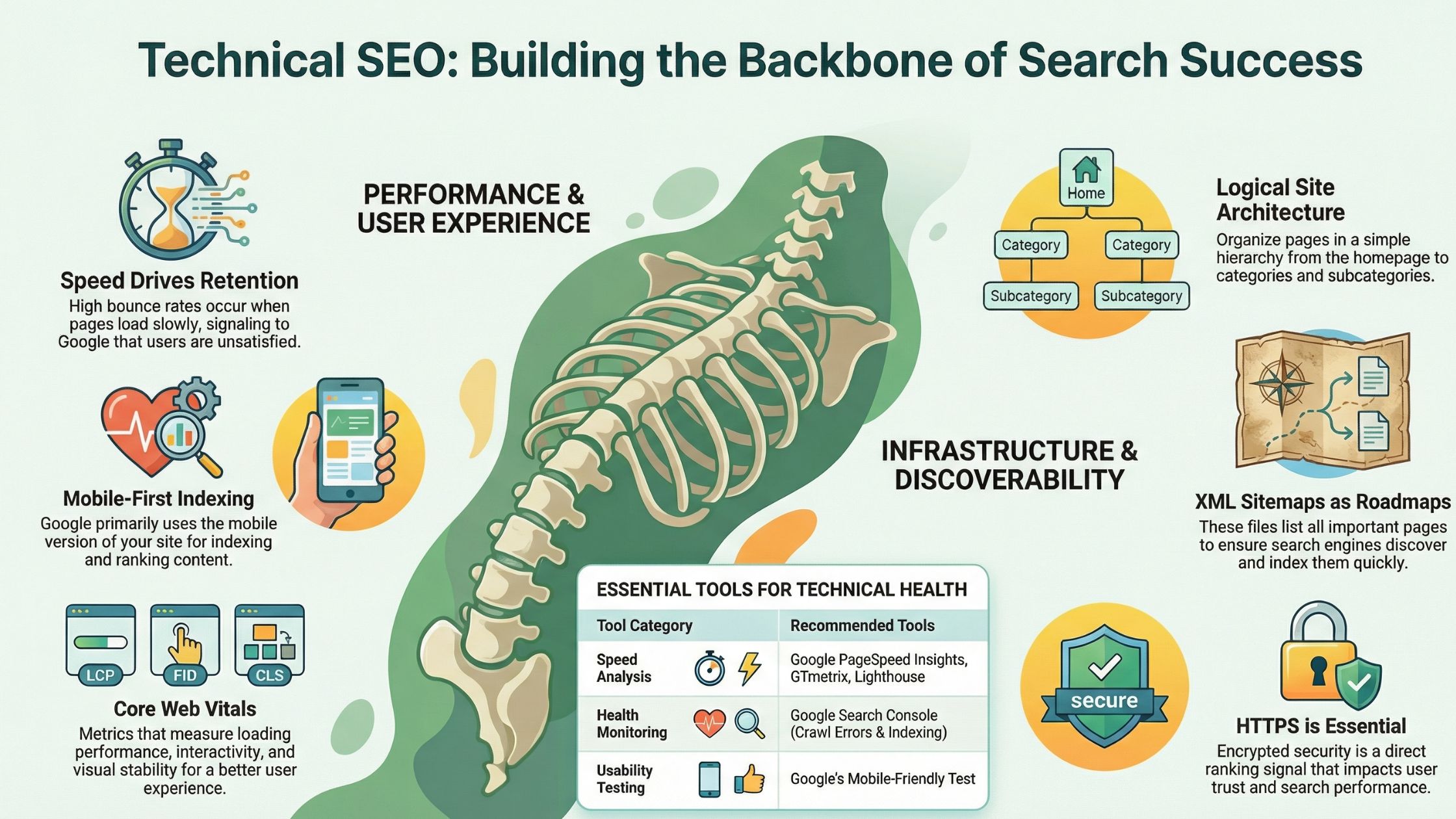
Website speed is one of the most important technical SEO factors because it influences both search engines and real users. People expect websites to load quickly; if your pages take too long, visitors will leave, resulting in high bounce rates. Elevated bounce rates, in turn, tell Google that users aren’t satisfied with your content. This can negatively impact your rankings. A fast website improves overall performance, user engagement, and conversion rates.
Tools to Measure Your Page Speed
To ensure your website loads quickly, you need accurate performance measurements. There are several tools available online such as Google PageSpeed Insights, GTmetrix, Lighthouse, and Pingdom. These tools analyze your website’s loading speed, highlight issues like large image files or unoptimized code, and offer recommendations to improve overall performance.
How to Improve Website Speed
Improving website speed involves optimizing various elements. Images should be compressed and converted into modern formats like WebP. Browser caching can help reduce load times for returning users by storing website data locally. Minification of JavaScript, CSS, and HTML reduces file sizes and eliminates unnecessary code. Using a lightweight theme and a Content Delivery Network (CDN) can significantly enhance delivery speed, especially for users located far from your server.
Mobile-Friendliness and Responsive Design
Understanding Mobile-First Indexing
Google uses mobile-first indexing, which means the mobile version of your website is the primary reference for indexing and ranking. If your mobile site performs poorly, your entire website suffers. This makes mobile optimization crucial, especially as mobile browsing continues to dominate globally.
How to Ensure Your Website Is Mobile-Friendly
A mobile-friendly website needs responsive design, meaning the layout automatically adjusts to different screen sizes. Text should be readable without zooming, buttons should be easy to tap, and pages should load quickly even on mobile networks. Avoid using intrusive popups that block content, as they lead to poor user experiences. Test your website using Google’s Mobile-Friendly Test tool to ensure it meets all mobile usability standards.
Creating a Clean Site Architecture
Importance of Site Structure
Site architecture refers to how your website’s pages are organized and linked together. A clean structure helps search engine crawlers understand your content hierarchy while making navigation easier for users. If your site is disorganized, crawlers may struggle to reach important pages, and users may leave due to poor navigation.
Best Practices for Site Architecture
A good site structure is simple, logical, and easy to navigate. Your homepage should link to key category pages, which then link to subcategories and articles. This helps distribute authority throughout your site and ensures important pages receive proper attention. Your URL structure should also be clean and descriptive, using hyphens instead of underscores and avoiding unnecessary numbers or random characters.
XML Sitemaps and Robots.txt
What Is an XML Sitemap?
An XML sitemap is a file that lists all important pages on your website, making it easier for search engines to discover and index them. It acts like a roadmap that guides crawlers through your website. Submitting your sitemap to Google Search Console ensures your pages get indexed more quickly.
The Role of Robots.txt
The robots.txt file gives instructions to search engine crawlers. It tells them which pages or sections to access and which ones to avoid. This is useful for blocking sensitive areas like admin pages or duplicate content sections. However, it must be configured correctly—blocking the wrong pages can harm your SEO.
Website Security and HTTPS
Why HTTPS Is Essential
HTTPS is a security protocol that encrypts data between a user’s browser and your website. Google considers HTTPS a ranking signal and warns users visiting non-secure websites. This affects trust, conversions, and SEO performance. If your site still uses HTTP, it’s crucial to migrate to HTTPS.
How to Implement HTTPS
You need an SSL certificate installed on your server to enable HTTPS. Once installed, redirect all HTTP URLs to their HTTPS counterparts. Make sure your sitemaps, internal links, and canonical tags point to the HTTPS version to avoid duplicate content issues.
Fixing Crawl Errors
Common Crawl Errors
Crawl errors occur when search engine bots cannot access your pages. These errors include 404 pages, server issues, DNS errors, and redirect loops. Such issues prevent important content from being discovered and indexed.
How to Identify and Fix Crawl Errors
Google Search Console provides detailed reports under the “Coverage” section. Once you identify the errors, replace broken links, fix faulty redirects, and ensure your server is functioning properly. For pages intentionally removed, set up proper redirections or custom “Page Not Found” messages.
Handling Duplicate Content and Using Canonical Tags
What Causes Duplicate Content?
Duplicate content appears when multiple URLs lead to similar or identical pages. This can happen due to printing versions, HTTP vs. HTTPS versions, URL parameters, and CMS-generated pages. Duplicate content confuses search engines and splits ranking signals.
How Canonical Tags Solve the Problem
A canonical tag tells search engines which version of a page is the main one. By setting a canonical URL, you consolidate link equity and prevent search engines from indexing unwanted duplicates. This helps improve rankings and ensures proper indexing.
Structured Data and Schema Markup
What Is Structured Data?
Structured data, also known as schema markup, helps search engines understand the context of your content. For example, marking content as an article, recipe, review, or product helps Google display rich results like star ratings or FAQs.
Benefits of Schema Markup
Using schema markup improves your search visibility and click-through rates. It enhances how your page appears in search results, making it more attractive to users. Search engines can better interpret and categorize your content, leading to improved ranking opportunities.
Indexing Issues and How to Solve Them
Why Some Pages Don’t Get Indexed
Search engines may skip indexing some pages due to thin content, duplicate pages, blocked URLs, or poor-quality internal linking. This means your valuable content may never appear in search results.
Solutions for Indexing Problems
To resolve indexing issues, improve your content quality, strengthen internal linking across your website, remove any noindex tags applied accidentally, and ensure your sitemap is correctly submitted. You can also use the URL Inspection tool in Search Console to request indexing manually.
Core Web Vitals Optimization
Understanding Core Web Vitals
Core Web Vitals include three key metrics: Largest Contentful Paint (LCP), First Input Delay (FID), and Cumulative Layout Shift (CLS). These metrics measure loading performance, interactivity, and visual stability. Google uses them as ranking factors because they directly affect user experience.
Improving Core Web Vitals
To improve LCP, optimize images and reduce server response time. To fix FID issues, minimize JavaScript execution. To reduce CLS, ensure elements like images and ads have defined dimensions. Improving these metrics increases user satisfaction and supports SEO growth.
Image Optimization and Lazy Loading
Importance of Image Optimization
Images make up a majority of website data. If they are too large, they slow down loading times. Optimizing images ensures better performance and improved rankings.
How Lazy Loading Helps
Lazy loading delays the loading of images until users scroll down to them. This reduces initial load time and improves user experience. It is especially helpful for long blog posts or ecommerce pages with many images.
Technical SEO Checklist for Beginners
Building a Strong Technical Foundation
A beginner-friendly approach to technical SEO includes ensuring your website loads quickly, is mobile-friendly, uses HTTPS, has a clear site structure, and contains no crawl errors. You should also use structured data, optimize images, check for duplicate content issues, and monitor your site regularly using Search Console and analytics tools.
Conclusion: Beginner Guide to Technical SEO
Technical SEO may sound complicated at first, but once you understand its core components, it becomes much easier to manage. It forms the backbone of your website’s performance and ensures your content gets the visibility it deserves. By focusing on speed, user experience, security, indexing, and clean architecture, you build a strong foundation for long-term search success.
At Hawkeye Digital Creators, we encourage every business owner, blogger, and marketer to invest time in mastering technical SEO. It not only boosts rankings but also enhances user satisfaction and long-term website growth.