

What is Duplicate Content: Best Guide
Duplicate content is one of the most misunderstood topics in SEO. Many website owners assume that any repeated text across webpages will lead to a Google penalty—but that’s not true. While Google normally does not penalize duplicate content directly, it can significantly impact your search performance, rankings, and crawlability.
As a digital marketer or website owner, you cannot afford to overlook this issue—especially if you want your content to rank consistently. At Hawkeye Digital Creators, we help brands fix on-site SEO issues like duplicate content so their websites stay clean, optimized, and search-friendly.
This detailed guide explains what duplicate content is, how affects SEO, and the proven methods to find and fix it without hurting your traffic or rankings.
What Is Duplicate Content?
Duplicate content refers to substantial blocks of content that appear on more than one webpage—either within your website or across different sites. This duplication can be exact or near-identical.
Duplicate content can occur in two cases:
-
Internal Duplicate Content
When the same or very similar content exists on multiple URLs within your website.
-
External Duplicate Content
When another website publishes your content, intentionally or unintentionally.
Types of Duplicate Content
-
Exact Duplicate Content
Content that is word-for-word identical.
-
Near Duplicate Content
Content that is slightly rewritten but still conveys the same meaning.
-
Cross-Domain Duplicate Content
Content duplicated across two or more websites.
-
Technical Duplicate Content
Generated by:
- URL parameters
- session IDs
- printer-friendly pages
- HTTP vs. HTTPS
- WWW vs. non-WWW versions
These issues result from improper technical setup rather than intentional copying.
What Causes Duplicate Content?
Duplicate content isn’t always created intentionally. Most cases are due to technical issues, SEO mismanagement, or content structure errors.
-
URL Variations
Tracking codes, UTM parameters, and query strings generate multiple URLs for the same page.
-
Session IDs and Filters
E-commerce websites often create duplicate pages when users apply filters.
-
Multiple Versions of the Same Page
Examples:
- https://website.com
- https://www.website.com
- http://website.com
- https://website.com/index.html
If not canonicalized properly, Google may treat these as separate pages.
-
Pagination Issues
Category pages and blog archives often duplicate content across multiple pages.
-
Thin Content
If pages contain very little content, Google may see them as duplicate.
-
Copied or Scraped Content
Other websites may copy your blogs without permission.
-
Printer-Friendly Pages
These pages often have identical content on different URLs.
How Duplicate Content Affects SEO
Even though Google does not penalize duplicate content manually, it still harms SEO in several ways.
-
Keyword Cannibalization
Multiple pages target the same keywords ? Google becomes confused about which page to rank.
-
Loss of Ranking Power
When multiple pages contain the same content, link equity gets diluted.
-
Crawl Budget Waste
Googlebot wastes time crawling duplicate URLs instead of unique content.
-
Indexing Issues
Google may de-index the duplicate page—sometimes even the wrong one.
-
Lower Organic Visibility
Duplicate content reduces content quality and authority, hurting rankings.
What Google Says About Duplicate Content
Google clearly states that duplicate content is NOT a penalty unless it’s deceptive or manipulative. However, Google filters duplicate content and chooses only ONE version to show. This is where most SEO problems occur.
Google tries to:
- pick the “best” version
- ignore the others
- consolidate ranking signals
If Google chooses the wrong version, your traffic can drop significantly.
How to Find Duplicate Content
Here are the most effective methods and tools to detect duplicate content on your site.
-
Use Google Search Console
Go to Indexing ? Pages
Look for:
- Duplicate without user-selected canonical
- Duplicate, Google-selected canonical differs from user-selected
-
Use Screaming Frog
Crawl your website to detect:
- duplicate titles
- duplicate meta descriptions
- duplicate H1s
- thin content
- similar content blocks
-
Use Copyscape
Best tool to detect external duplicate content and plagiarism.
-
Use Siteliner
Analyzes internal duplicate content.
-
Manual Google Search
Paste the content inside quotes (“” “) to check duplicate results.
How to Fix Duplicate Content (Most Effective Solutions)
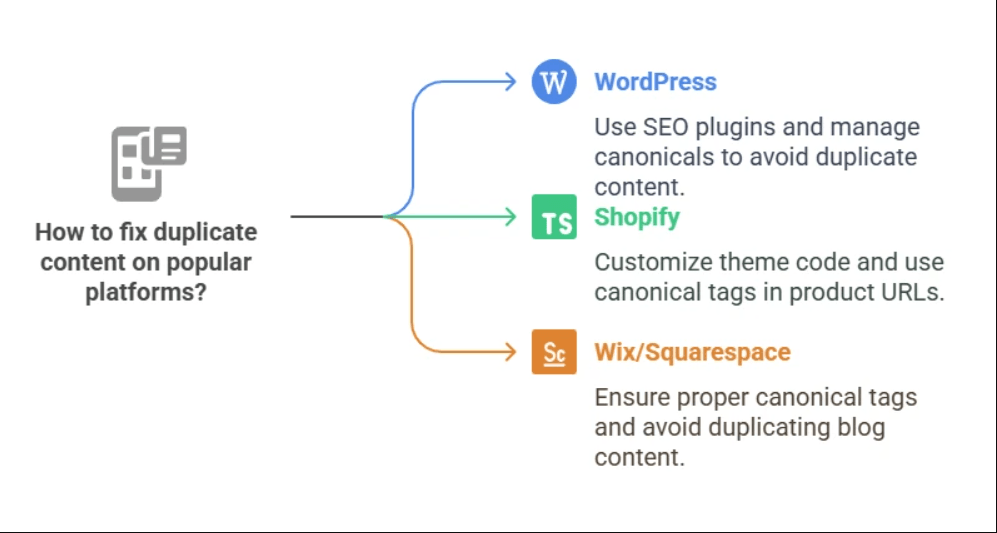
Here are the proven methods Hawkeye Digital Creators uses for clients to eliminate duplicate content:
-
Add Canonical Tags (Most Recommended)
Canonical tags tell Google which version of a page is the original.
Example:
Use canonicals for:
- pagination
- filters
- similar category pages
- parameter-based pages
-
Use 301 Redirects
If two pages have the same purpose, redirect the weaker one to the stronger one.
Example:
- /mobile
- /mobile-phones
Redirect duplicate ? original.
-
Noindex Tag
If duplicate pages exist for technical reasons (like print pages), add:
-
Consolidate Pages
If two articles cover the same topic, merge them into one strong pillar page.
-
Rewrite Unique Content
Rewrite or expand thin or similar content to make each page stand out.
-
Fix WWW vs. non-WWW Issues
Choose one version and redirect the other.
-
Force HTTPS Version
Redirect all HTTP URLs to HTTPS.
-
Manage URL Parameters
Use Search Console ? URL Parameters to instruct Google how to handle parameters.
-
Avoid Boilerplate Repetition
Elements like product descriptions or service descriptions should be unique for each page.
-
Use Hreflang for Multilingual Sites
If you have multiple language versions, hreflang helps prevent duplicate confusion.
How to Prevent Duplicate Content (Best Practices)
- Create unique content for every page
- Use canonical tags strategically
- Avoid publishing the same blog on multiple platforms
- Add hreflang for international content
- Maintain a consistent URL structure
- Audit content regularly
- Avoid doorway pages
- Keep category pages unique
Duplicate Content Myths Debunked
Myth 1: Google Penalizes Duplicate Content
Fact: No penalty unless malicious.
Myth 2: You cannot publish similar product descriptions
Fact: You can, but it’s better to rewrite them.
Myth 3: Having duplicate content automatically ruins SEO
Fact: Google simply filters duplicates.
Myth 4: Rewriting small changes removes duplication
Fact: Near-duplicate content still counts as duplicate.
Real-Life Example (Hawkeye Digital Creators Strategy)
Imagine a website with 500 high-quality pages, each designed to target specific keywords and bring in organic traffic. However, due to URL parameters, filter-based URLs, pagination issues, and session IDs, the website unintentionally generates over 2,000 extra duplicate URLs.
Google’s crawler gets stuck indexing these unnecessary variations instead of focusing on the real, valuable pages. As a result:
- Crawl budget gets wasted
- Important pages are ignored
- Rankings drop
- Organic traffic becomes unstable
But once the issues are identified, the right SEO actions turn everything around.
After Fixing the Duplicate Content Issues
To fix the problem, Hawkeye Digital Creators implemented a complete cleanup:
- Added canonical tags to guide Google to the preferred main version of each page
- Applied 301 redirects to remove unnecessary duplicate URLs
- Consolidated thin and overlapping content into stronger, more authoritative pages
- Refined the internal linking structure to distribute page authority correctly
Final Outcome
Once the technical SEO cleanup was complete, the website saw major improvements:
- Crawl budget was optimized, allowing Google to focus on important pages
- Search rankings became more stable and higher across targeted keywords
- Content authority and trust improved, helping boost domain strength
- Overall organic performance increased significantly
This is exactly how professional SEO agencies like Hawkeye Digital Creators diagnose, repair, and prevent duplicate content issues for long-term, sustainable growth.
Conclusion
Duplicate content may not cause a manual Google penalty, but it can hurt your SEO performance, crawlability, indexing, and rankings. By using proper technical fixes like canonical tags, redirects, rewriting, and indexing control, you can maintain a clean SEO structure and ensure Google ranks the right pages.
For brands looking to build authority, improve content quality, and strengthen organic performance, understanding and fixing duplicate content is essential. At Hawkeye Digital Creators, we recommend regular content audits and technical optimization to keep your site ranking smoothly and confidently.


